Authorization
Private instance
By default, device types, devices and test jobs are publicly visible meaning that a non-authenticated users can view everything. This does not apply to submit and change permissions.
It is possible to require all users to login before accessing any page outside
the home page, documentation pages and the login page itself by setting the
REQUIRE_LOGIN: true in any YAML configuration file under
/etc/lava-server/settings.d/*.yaml.
If gating the entire instance is too broad, the REQUIRE_LOGIN_PATHS variable
can instead require login only for specific parts of the UI. It takes a list
of URL path prefixes, relative to the instance mount point, and each prefix
covers itself and everything below it. This is useful to protect expensive
pages, for example the query UI, from anonymous users and web crawlers while
keeping the rest of the instance public:
REQUIRE_LOGIN_PATHS: ["results/query", "results/chart"]
Both of the above gate whole pages. PUBLIC_JOB_WINDOW_DAYS instead limits how
far back an anonymous user can see, while keeping recent activity public. When
set to a number of days, test jobs submitted before that are visible only to
authenticated users:
PUBLIC_JOB_WINDOW_DAYS: 30
This is intended for public instances being enumerated by crawlers, where the scraped pages are the same pages people use and only the age of the referenced job distinguishes the traffic. Job submitters, superusers and any user holding the global view permission are unaffected at any age.
Note that this applies to every interface, not only the web UI. Anonymous
requests to the REST API and to XML-RPC are restricted in the same way, so
scripts that read old jobs without authenticating will stop working. Clients
authenticating with a token, including LAVA workers and CI, are unaffected. The
default is None, which disables the restriction and preserves the historical
behaviour.
For a public instance, the access can be controlled globally or per-object.
Global authorization
LAVA's global authorization is built on top of Django's permission system. A user can hold a global permission for any system entity. Global permissions are checked first and take precedence over per-object permissions. They are managed through the Django admin user settings.
Test job visibility has one global permission, view_testjob. A user holding
it can see every test job, including private jobs and jobs older than
PUBLIC_JOB_WINDOW_DAYS. Grant it to a group in the Django admin group editor
or with the XML-RPC auth.groups.perms.add call
(auth.groups.perms.add <group> lava_scheduler_app testjob view_testjob);
it is not granted to any group by default.
Per-object authorization
LAVA per-object authorization is used to apply fine-grained access to a specific objects in the system. For example, it can be used to hide a specific device (and all jobs on that device) from the public.
The per-object system is group-based and applies to:
- Device Type
- Device
Test Job
Test jobs are not directly controlled through per-object group
permissions. Test job visibility is determined by inheritance from the
device or device type it belongs to, along with the job-level
viewing_groups and is_public fields.
The supported per-object permissions are:
- view
- submit
- change
Important
LAVA per-object authorization works in an inverse manner. This means that if no permissions are assigned to an object, that object is considered unrestricted and is visible to everyone. Once a permission is assigned to an object for a specific group, only members of that group (and superusers) are granted the corresponding access.
Permission inheritance
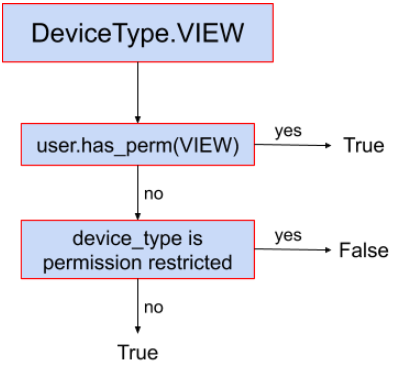
As we already covered that the object is permission restricted if it has any permission assigned for a specific group and permission unrestricted otherwise.
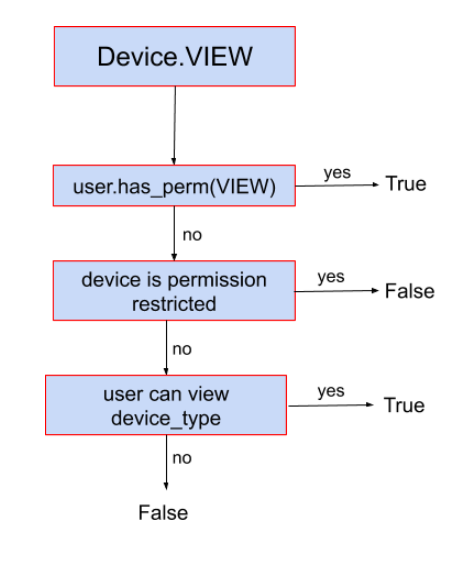
Since every device belongs to a device type, and every test job is associated with either a device (actual) or a device type (requested), permissions cascade from parent to child when the child object is unrestricted.
For example, the device qemu01 is permission unrestricted but the qemu
device type has a permission to allow group lkft to view it. Only users from
this particular group will be able to see device qemu01 even if it’s not
permission restricted because the underlying device type has the restriction.
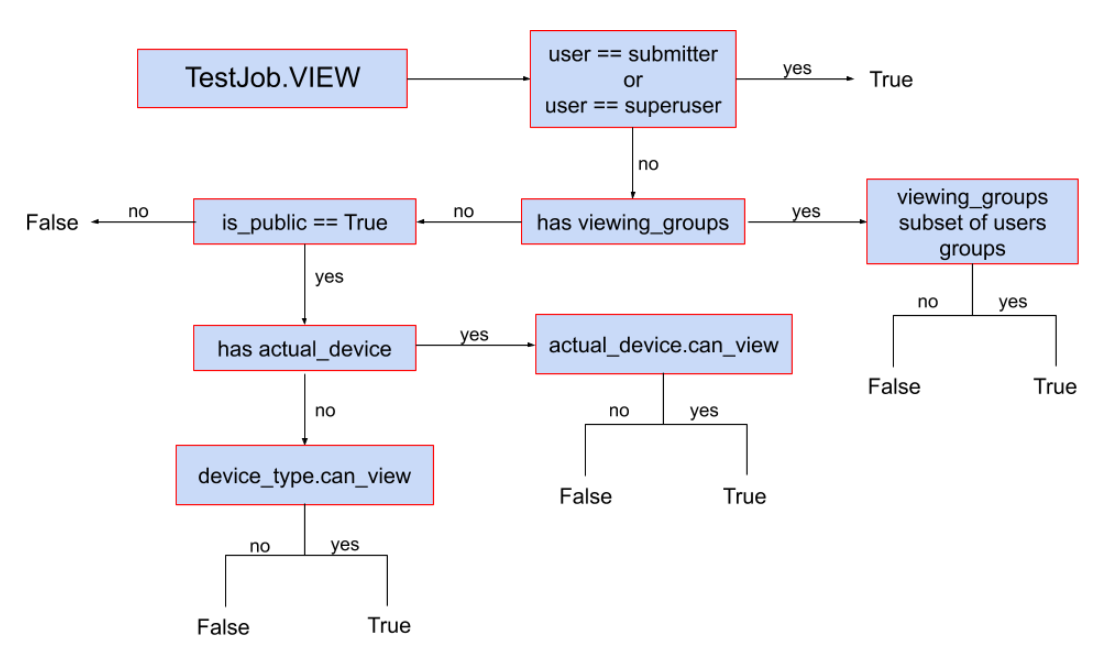
The same goes for test jobs. If the test job is not permission restricted it
will be visible only if device and device type it belongs to are unrestricted,
or if the user belongs to one of the groups the view permission applies to.
This means that setting a restriction on a device type automatically restricts all devices of that type (and all jobs on those devices) without requiring individual configuration.
This particular behavior allows admin to set the permissions on higher level,
and it will be applied to all the lower level objects. For example, if you set
the view permission for aforementioned lkft group for the device type, all the
devices and test job will be automatically hidden for non-lkft users.
Conversely, a more specific permission at the lower level takes precedence. For example, if a group has direct access to a device, that access applies regardless of whether the same group has any permission on the parent device type.
Test job visibility
Test job visibility has two additional fields that override the inherited device/device-type permissions.
viewing_groups
If viewing_groups is set on a test job, the user must belong to all the
specified groups to view the job. This field has higher priority than per-object
device/device-type authorization and can be set in the job definition by setting
job visibility to a list of groups.
is_public
Test job field is_public can be used to completely hide job from public. If
set to False, only submitter, superusers and users belonging to
viewing_groups field (if set) will be able to view the test job. If set to
True, regular per-object authorization will be applied. This field can also be
set in the job definition by setting job
visibility to personal.
Visibility decision trees
Device type
Device
Test job
Examples
For the sake of simplicity, let's say we have device-type1, device1 (of
device-type1), and groups group1 and group2.
- No per-object permissions set on
device-type1nordevice1: All authenticated as well as anonymous users are able to accessdevice-type1,device1page and all test jobs view pages (e.g.,/scheduler/device_type/qemu) as well as plain logs etc. All authenticated users are able to submit jobs todevice1. No anonymous users can submit jobs (ever). device1has a per-object permissionCan submit to deviceset togroup1: Now only users fromgroup1are able to submit jobs todevice1. All authenticated and anonymous users are still able to viewdevice1and all jobs running on it since there's no restriction for view permission.group1has a per-object permission view fordevice-type1anddevice1has no per-object permissions set: only users fromgroup1can view thedevice-type1,device1and all associated test jobs. No-one else.group1has a per-object permission view fordevice-type1andgroup2has a per-object permission view fordevice1: users fromgroup1are not able to viewdevice1(nor any test jobs running on it) but they will be able to accessdevice-type1details page. Users fromgroup1will be able to view other devices (if any) of thedevice-type1, but only if those devices have no view permissions set for them (or they belong to some other groups that are included in those permissions). Users fromgroup2will be able to view thedevice1and all the test jobs running on it but will not be able to access thedevice-type1detail page.